Understanding the webkit and why we use it
Why we need the webkit, and when to use it
The webkit is a piece of software that lives on the Edgeryders server. It creates instant websites based on files of a special type, called the configuration files. Each configuration file generates a website. The webkite can in theory support an infinite number of websites. This addresses a strong need in Edgeryders, that of having multiple, simple, specialized websites. The platform is great, but it is very big (70,000 posts) and can be intimidating. For example, you could want a simple website for your unit (like this, or for an event you are organizing.
The webkit allows us to do this, with:
- No need to install anything. No matter how many websites we make, they are all created by the one installation already on our server.
- No need for software other than the browser you already use to access the Edgeryders platform.
- Full compatibility with the platform. You can tell the webkit to display on your website the content of a single Edgeryders post, but also of a category, or a Discourse tag. Anything you can display on edgeryders.eu you can also display on a webkit website.
- Automatic updating. Suppose your website contains a feed from the Campfire category: when a new post is made in that category on the platform, it will automatically show up on the website. This last feature is useful because it means we can control what’s on our website simply by making normal edits to posts on the platform. For example the list of projects here: Edgeryders | Start is taken from this post. If we want to add a project we just need to edit the post, and it shows up automatically on the website.
How it works: introducing configuration posts
To access a webkit website, type in the address box of your browser:
https://live.edgeryders.eu/12345
Where 12345 is the number of a topic in edgeryders.eu that contains the configuration file. You will find the same topic at https://edgeryders.eu/t/12345. For example, the Research Network’s website lives at `https://live.edgeryders.eu/13865, and is generated by the configuration file that lives at research.edgeryders.eu - Webkit XML.
Configuration files contain the instructions for the webkit to render your website. They live in posts on the edgeryders.eu platform. This means you can create and edit one just as you do with any post. But they look and behave a little differently from normal forum posts. In the rest of this manual, we speak therefore of configuration posts.
Webkit configuration posts are in a format called XML. XML files are made of “blocks”; each block contains some content and some styling decisions about that content. Look at this example:
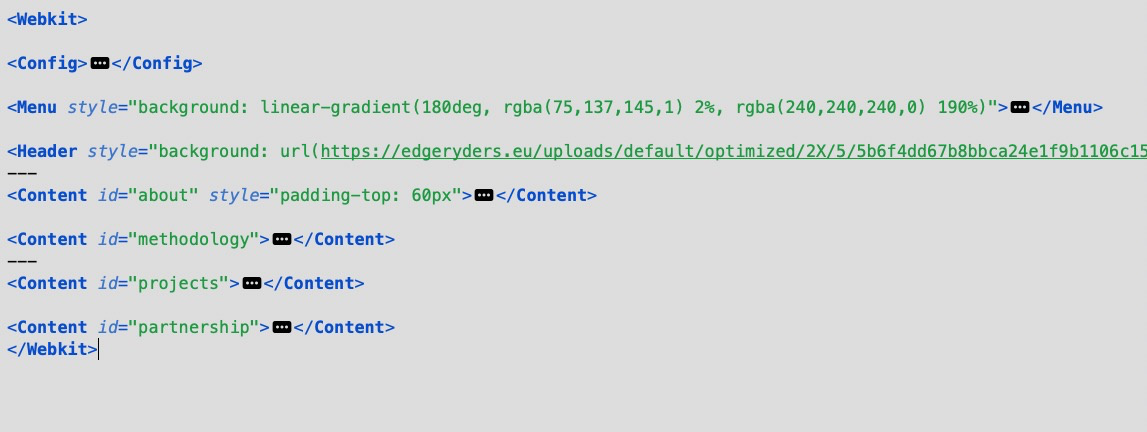
You can see seven blocks: Config, Menu, Header, and four Content blocks, called "about", "methodology", "projects" and "partnership". You can have as many blocks as you want. Making a website with the webkit is about deciding which blocks you want; then preparing the content (text, pictures, videos… ) for each block; putting the blocks into your configuration post; and adding some finishing touches as needed.