Hello @reeflings , yesterday I accidentally unshared our master folder in NextCloud. I immediately reshared it, but only nine folders became available.
No file has been lost. I will open a ticket today to resolve the issue. Apologies.
Hello @reeflings , yesterday I accidentally unshared our master folder in NextCloud. I immediately reshared it, but only nine folders became available.
No file has been lost. I will open a ticket today to resolve the issue. Apologies.
 BREAKING NEWS: Security breach at the secret garden
Drunk after the BBQ, a future resident tries to evict the entire community with a single click.
The facts: We thought he was just busy digesting his skewers on our future plot, but the suspect was playing a much darker game. Seized by a sudden wave of post-BBQ digital panic, this rogue user deleted all access rights to the project’s root folder.
In a single click, the Reeflings found themselves virtually homeless, with only 9 surviving folders left for shelter. One witness reported: “The place isn’t even built yet and we’ve already been locked out. He’s the first person in history to pull off a digital eviction.”
Breathalyzed by the chat group, the individual immediately pleaded absolute sobriety: “It was an accident! I just wanted to close the garden gate, not lock the server room!”
The damage: No casualties, zero file loss. The culprit has promised to open a “support ticket” (we are currently checking if this ticket can be redeemed for a free beer at the next barbecue).
Hi @Alberto, @Lee
What I have noticed :
Discovered the same as Lucia.
I’ve already updated some links in a post, so if the old links are retrieved, let me know so I can change the links again.
What is also annoying is that all folders have now the same timestamp
@alberto if the links have changed this is a bit of a problem. I’m thinking of the entire onboarding file, which has a whole lot of links, and the decision log, on which I spent quite a lot of time (two links for every decision taken since we started). Can you please have a look and see whether we can get the same links again?
Hello all
Suppose you have circulated a link like this:
https://thereef.brussels/s/old-link
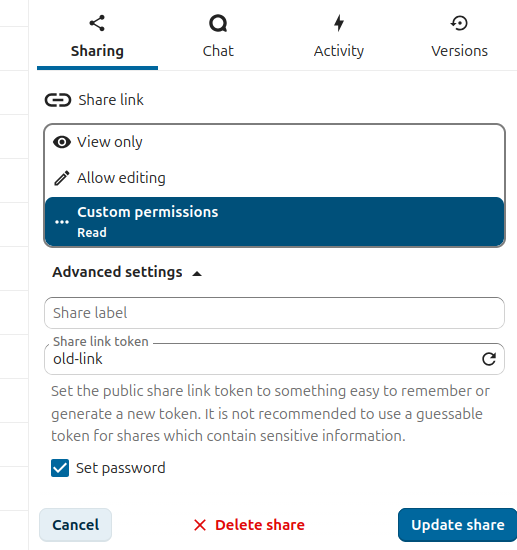
And now you want to assign the same link to a different file on Nextcloud. In this case, the reshared files are identical in filename and content to the old ones, but they have different IDs, so Nextcloud sees them as different.
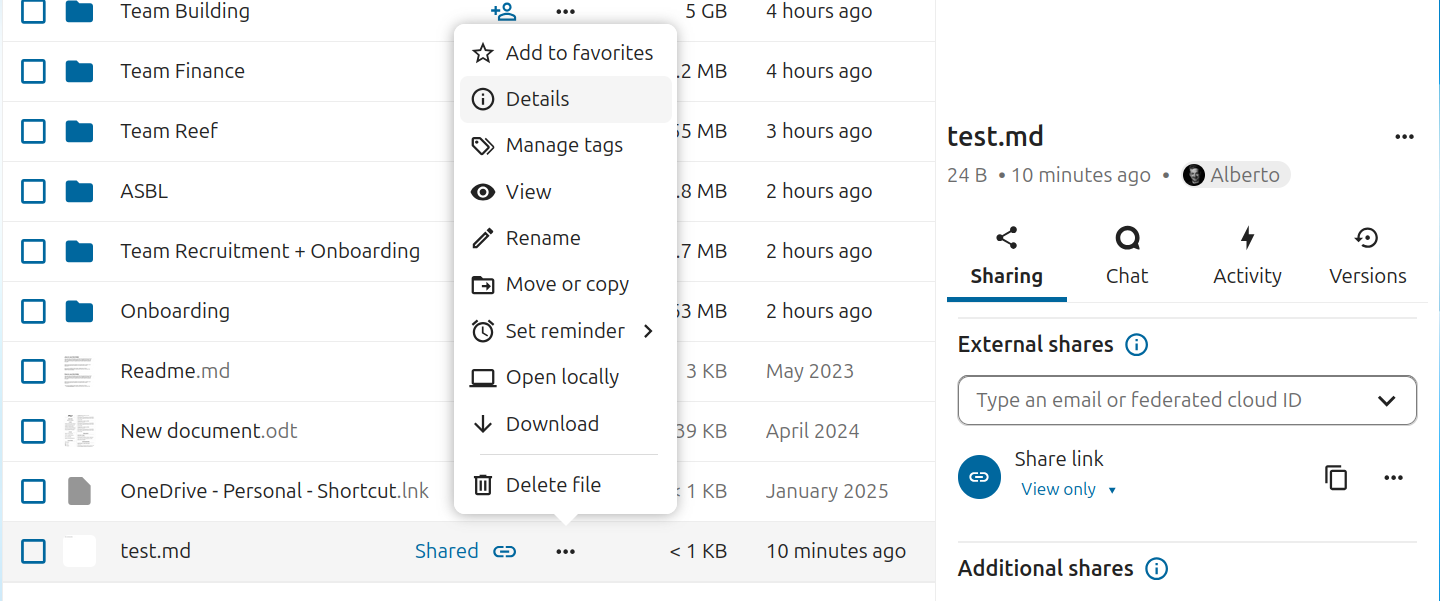
DetailsExternal shares => Share link click on the three dots to open the menu and select Customize link.Share link token textbox and enter the token, in this case old-link. Then, click Update share and you are done.Note 1: the link token is what comes after https://example.com/s/. Note 2: our links will work under our own domain: https://nl.tabdigital.com/s/mylink is equivalent to https://workspace.thereef.brussels/s/mylinkThanks @alberto. I find it difficult to fathom having to do that for all the links in the onboarding file and the decision log, and leave so many more links to be broken. I’m crossing my fingers the helpdesk can make it work.
@reef-it : i’ve forwarded you a mail from the architects. I reshared the internal link of ‘their’ folder on Nextcloud, but they still get an error.
Update: I asked Tab.Digital to restore from backup. This will solve the issue with the broken link, but then we will need to rebuild the last three days of additions. To keep this gap manageable, I have set the shared folder to read only. Please save your files in your own machines for now, this should be a matter of hours, not days.